Step 1
To add a QR code, simply click on the QR code icon in the top-left of the editor, as highlighted in the screenshot below.
Template used in this guide: Apple Blossom
Template used in this guide: Apple Blossom
Step 2
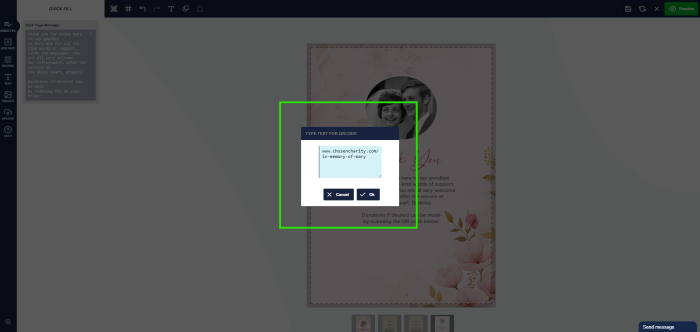
A pop-up will appear, prompting you to add the destination URL of where you would like the QR code to link to.
Step 3
Once your QR code has been generated, you can apply your preferred styling.
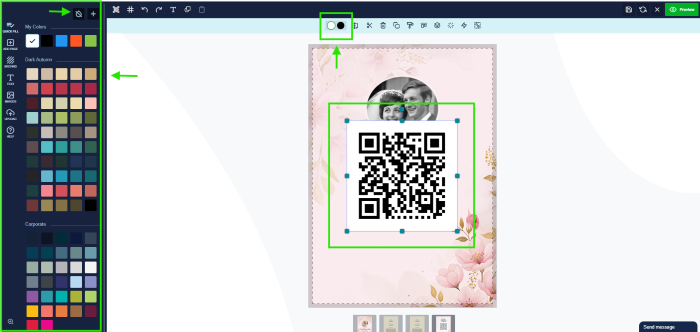
To do this, simply click on the QR code. You’ll see two coloured dots appear in the top toolbar — the first lets you change the background colour, and the second allows you to edit the QR code colour.
If you’d like to remove the background, just select the Remove Colour icon at the top of the colour palette options.
To do this, simply click on the QR code. You’ll see two coloured dots appear in the top toolbar — the first lets you change the background colour, and the second allows you to edit the QR code colour.
If you’d like to remove the background, just select the Remove Colour icon at the top of the colour palette options.

Step 4
You can then resize and position the QR code to compliment the design.
Please note: Do not make the QR code too small, as it may stop it working.
Please note: Do not make the QR code too small, as it may stop it working.